About SimFer
SimFer is a user-friendly platform designed to make file sharing as seamless as possible. By prioritizing simplicity and accessibility, SimFer allows users to transfer files directly between devices without the need for complex software or third-party services. With a few clicks, users can upload their files, generate a sharing link or OTP (One-Time Password), and send it to their intended recipients for instant access.
Unlike traditional file transfer methods that often require time-consuming uploads to servers or cloud platforms, SimFer focuses on direct sharing between users. This approach not only saves time but also provides a streamlined experience where files are accessible in real-time. SimFer is particularly well-suited for those who want to share files without dealing with unnecessary steps like account creation or lengthy setup processes.
Designed with everyday users in mind, SimFer ensures that even those who are less tech-savvy can easily share files. Its intuitive drag-and-drop functionality, simple interface, and step-by-step prompts make the entire process straightforward. Whether you're working on a collaborative project, sending important documents to colleagues, or simply sharing memories with friends and family, SimFer offers a hassle-free way to get your files where they need to go.
One of SimFer's standout features is its focus on real-time sharing. By keeping the browser tab open during transfers, users can ensure uninterrupted delivery of their files. This real-time connectivity ensures that the transfer process is both efficient and reliable, allowing users to stay focused on their tasks without delays or interruptions.
SimFer is more than just a tool; it's a solution for individuals and teams looking to simplify file sharing. Its versatility, ease of use, and emphasis on providing a smooth user experience make it a go-to choice for anyone who values convenience and efficiency in their daily workflows.
Key Features
- File Upload: Drag and drop files to share instantly. The process is quick and effortless, allowing users to begin sharing files in seconds.
- OTP: Download files using a one-time password, providing an alternative to sharing a link. This feature is particularly useful in situations where sharing a link is inconvenient or impractical, allowing recipients to access files securely and directly with the provided OTP.
- Real-Time Sharing: Files are transferred directly between users without server delays. As the file travels directly from the uploader to the downloader, transfers are fast and efficient.
- Distributed Sharing: Once a file is downloaded by a user, they also become a temporary sharer. This distributed sharing model allows for faster downloads as additional users contribute to the file transfer process.
- Accelerated Speeds with Multiple Sharers: The more users who are sharing the file, the faster subsequent downloads can be. This peer-to-peer approach leverages shared bandwidth for optimized performance.
- Cross-Platform: Works on any modern browser and device, ensuring compatibility across desktops, tablets, and smartphones. There’s no need for specialized hardware or software.
- No Registration: Share files without creating an account or dealing with lengthy sign-up processes. SimFer is built for convenience and ease of use.
- No Installation: Entirely browser-based, requiring no software downloads. Everything is handled within your browser, making the platform lightweight and accessible.
How It Works
Step 1: Upload Files
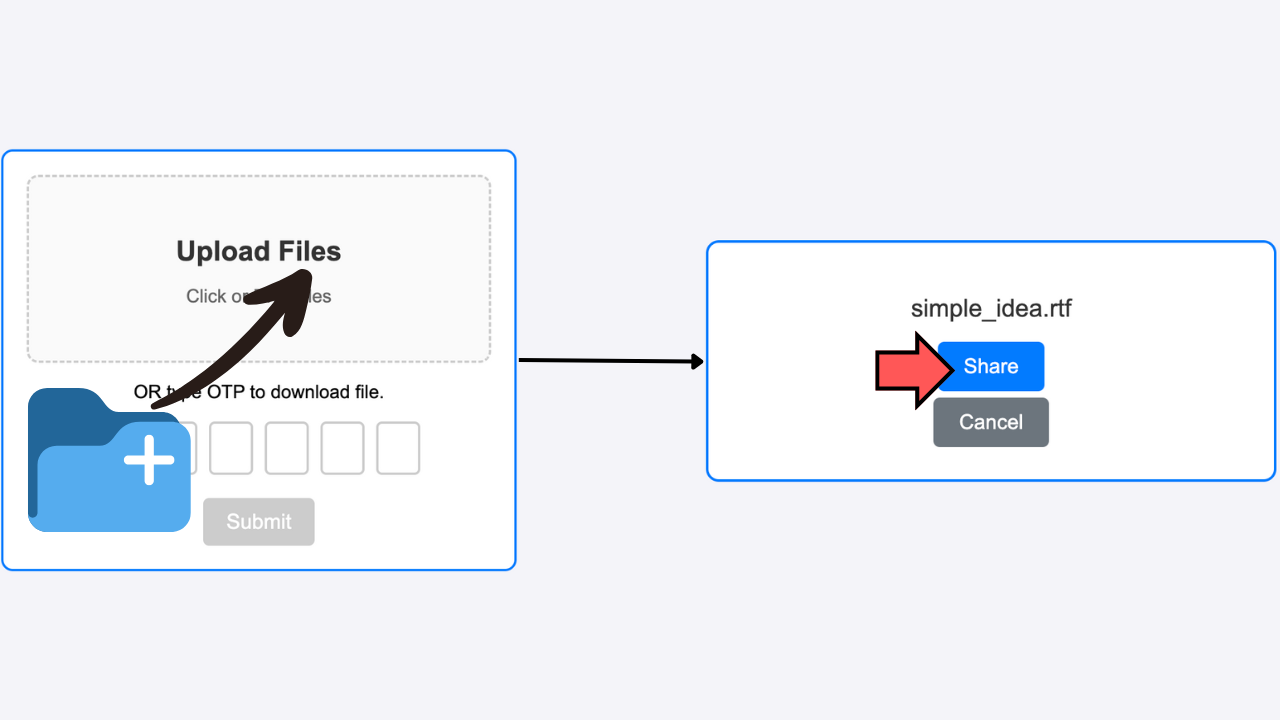
Drag and drop files into the upload area or click to select files. Once uploaded, you’ll see the file name and sharing options.
Step 2: Generate Sharing Link
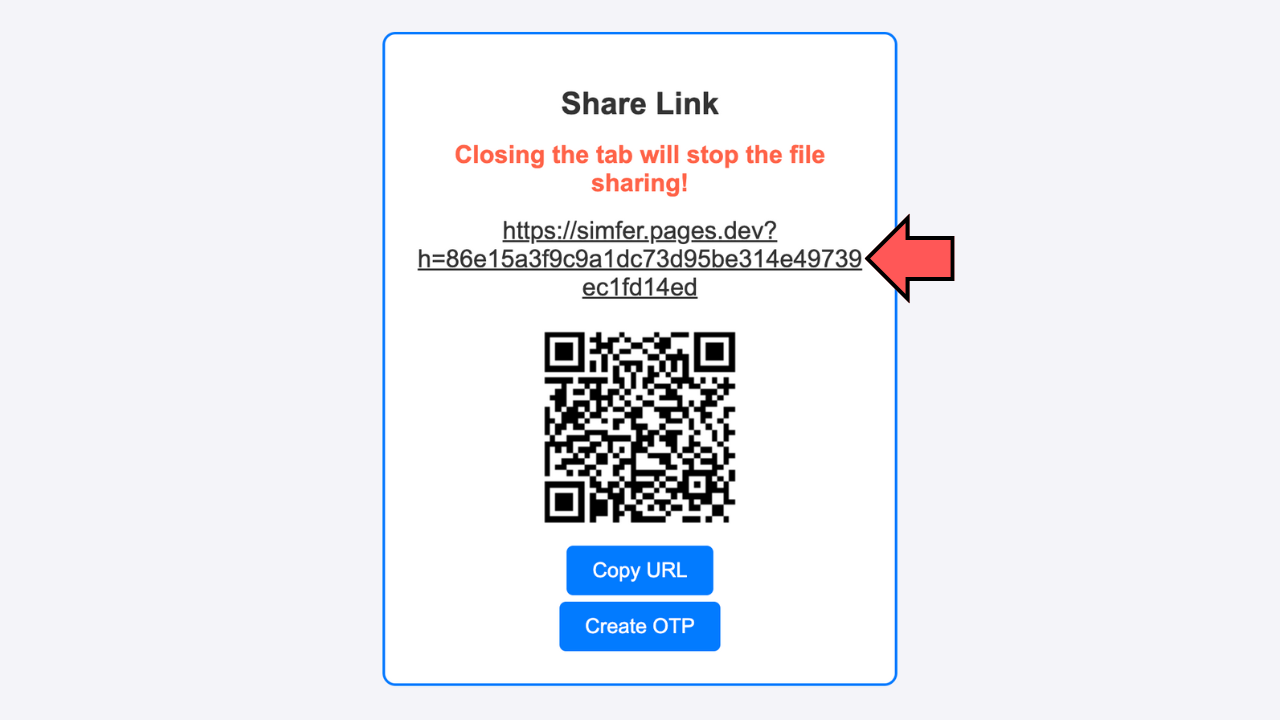
After uploading, SimFer generates a unique sharing link. You can also create a QR code or OTP for quick access.
Step 3: Download Files
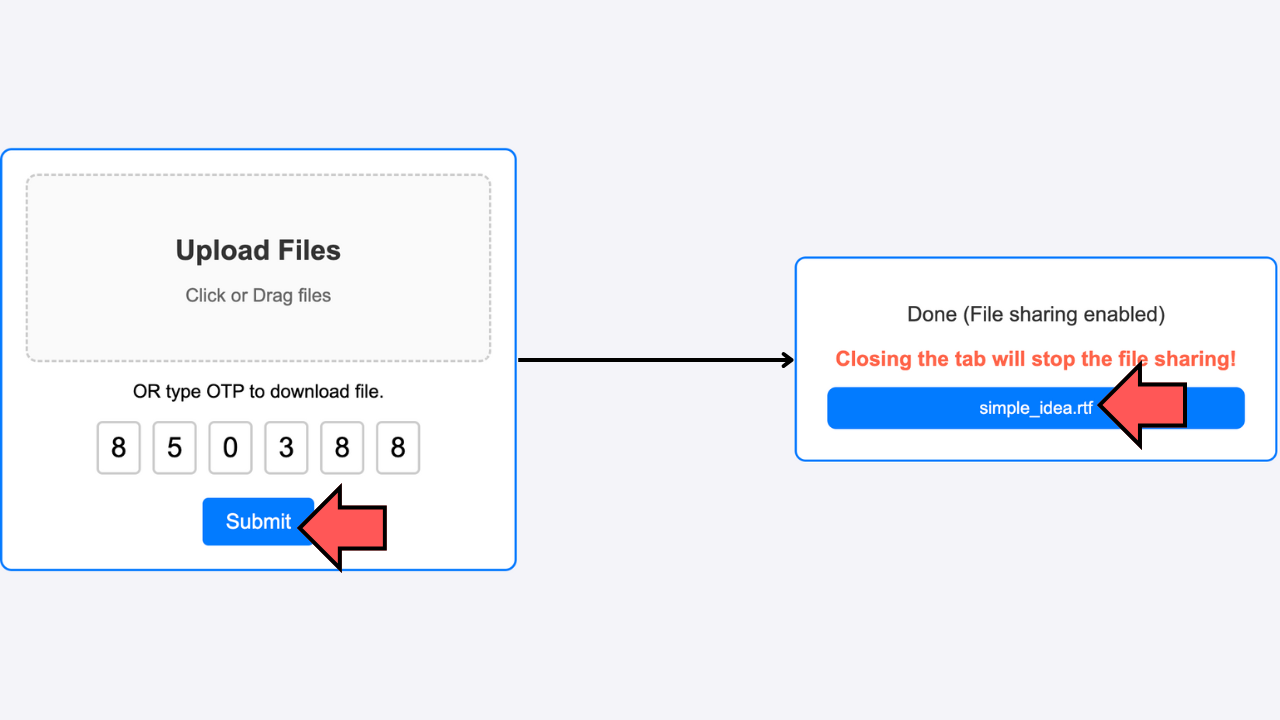
Recipients can download files directly using the link or OTP. Ensure the browser tab remains open during transfers for uninterrupted sharing.
Step 4: Sharing Continues with Downloaders
Once a file is downloaded, the recipient’s browser also becomes a temporary sharer. This distributed sharing ensures that the file can continue to be downloaded by others, improving overall transfer efficiency.
Important: If all sharers close their browser tabs, the file can no longer be downloaded. To keep the file available, at least one sharer must keep their browser tab open.
Note: Files are not stored on a server. Transfers happen directly between peers.
Use Cases
SimFer is designed to meet the diverse needs of users who require a reliable, secure, and efficient method for transferring files. Its versatility makes it a suitable choice for a wide range of scenarios, whether you're an individual sharing personal files or a team collaborating on professional projects. Here are some common use cases where SimFer excels:
- Sharing documents, images, or videos with friends or colleagues: SimFer simplifies the process of sending files, whether it's a set of family photos, a video presentation, or a work-related document. With its intuitive drag-and-drop interface and instant sharing capabilities, you can quickly upload and share files without needing to worry about additional steps like email attachments or file size limits.
- Collaborating on projects with teammates or clients: For remote teams and freelancers, SimFer provides a practical solution to send project files, design drafts, or large datasets in real-time. The ability to generate shareable links or OTPs ensures that recipients can access files instantly, streamlining collaboration and reducing delays.
- Sharing media content without relying on cloud storage: Many users need to share high-resolution photos, videos, or audio files that are too large for email. SimFer eliminates the need for uploading these files to cloud storage platforms, enabling faster and more direct transfers without using third-party servers.
- Real-time sharing during meetings or events: During virtual meetings, webinars, or collaborative brainstorming sessions, participants can use SimFer to quickly exchange files without interrupting the flow of the event. From sharing presentation slides to distributing meeting notes, SimFer ensures seamless communication and sharing.
- Providing files to clients or customers: Small businesses and service providers can use SimFer to send deliverables such as invoices, reports, or project outputs directly to their clients. The simplicity of generating a link or OTP ensures that even non-technical users can easily download the files.
- Exchanging personal files with ease: Whether it's sending vacation photos to family, sharing a playlist with friends, or sending documents for school projects, SimFer makes personal file sharing as easy as possible. Users can enjoy the freedom of sharing files without worrying about storage limits or platform compatibility.
These examples highlight the flexibility of SimFer in various contexts. No matter the scenario, SimFer is an invaluable tool for anyone looking to transfer files quickly, securely, and without complications.
User Guide
Follow these steps to get started with SimFer:
- Uploading Files: Drag and drop files into the upload area. Click the "Share" button to generate a link.
- Sharing Links: Copy the link or share the QR code with the recipient.
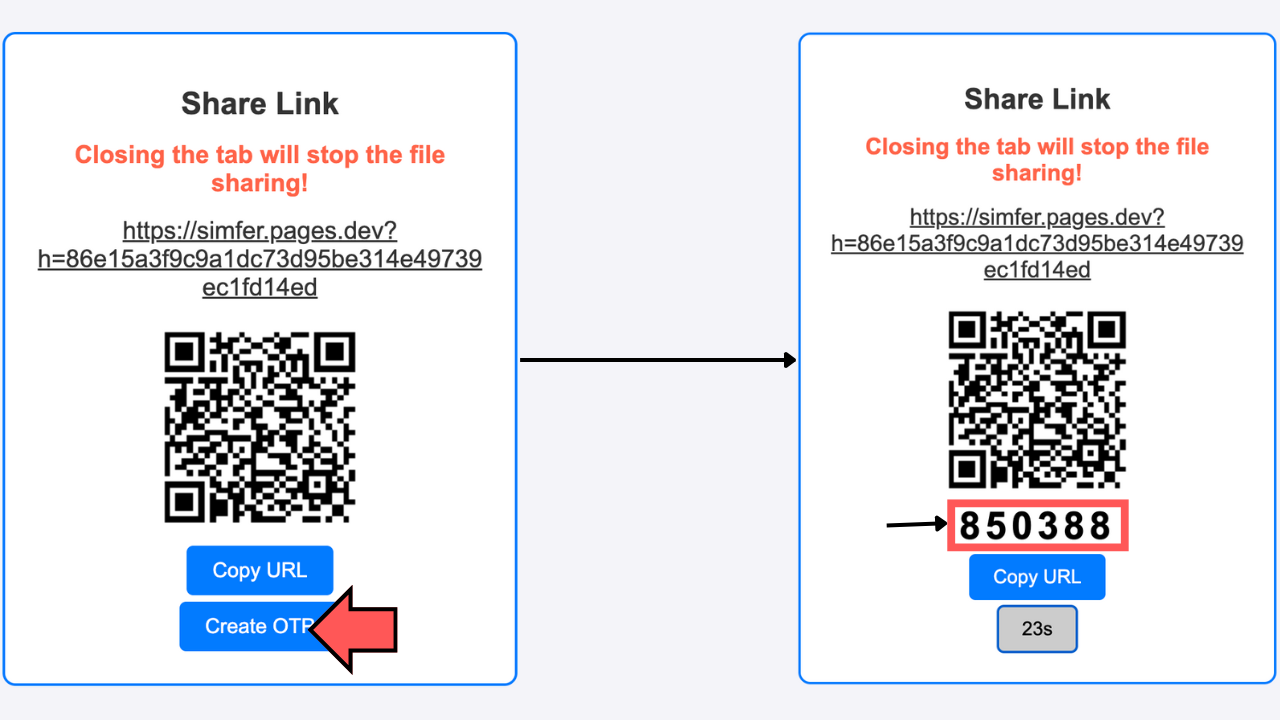
- Creating OTP: You can click "Create OTP" to generate a one-time password. Share the OTP with the recipient.
- Downloading Files: The recipient enters the OTP or clicks the link to start the download.
- Important: Keep the browser tab open during the transfer. Closing the tab will stop the sharing process.
Frequently Asked Questions
Is my data secure?
Yes! SimFer uses end-to-end encryption to ensure that your files remain private and secure.
What is the maximum file size I can share?
There is no hard limit, but performance may vary depending on your internet connection.
Do I need to keep my browser open?
Yes, since SimFer uses peer-to-peer technology, the transfer will only complete while your browser is active.